
The number ONE feature that will make your Canvas course faster to set up and easier for your students to navigate is……..modules. Organizing a course with modules not only helps students stay on track with expectations, but it also can help you keep track of what you are planning for each week, unit, or section of your course.
Tech Tips from ETS
A quick technology tip to help you engage your students whether in the classroom or remotely.
Tech- Collaborative Annotations with Canvas and Perusall
 |
||
|
Tech- Canvas Assignment tips and tricks
 |
||
|
Tech – Canvas Grading Tips

This week’s Canvas-related tip focuses on grading. After scouring the internet for helpful tips from those who have used Canvas a lot longer than those of us at Denison, ETS found a great video to share. Watch the video Top 5 Canvas Grading Tips for more on using rubrics, setting default grades, and more!
Do you have a Canvas tip you would like to share with colleagues?
Tech – Modules in Canvas: How to make them work for your class!
Modules again??? Yes, we know, modules again. BUT this week’s tech tip looks at three different ways you can use modules to organize class content and why you might want to use modules rather than the other course navigation pages. Plus, there are a few bonus tips (including how to add Google Docs)! Watch this video by Denison’s ETS team member Kelli Van Wasshenova to learn more about leveraging Canvas Modules.
Modules in Canvas: What they are and how to use them
Still wondering how to leverage the best parts of Canvas for your classes? Modules are a great way to present materials to your students. They are flexible, and you can set them up however you like. For some basics on modules, take a look at the Canvas instructor guides section on modules. Prefer a video? Here’s one that has an overview of modules.
Check out ETS’ Favorites List!
Canvas has so many resources to support instructors that it can be overwhelming what to choose. To make this much less daunting, ETS has curated a short list of video favorites, giving you a good start for using Canvas. Most are well under 5 mins long, and you can easily select to view only the topics that are of interest to you.
Quick Canvas Tip for Those Moments You Shout “Oh No! I did not mean to delete that!!”
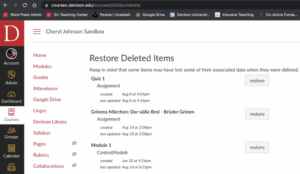
If you accidentally delete an item from Canvas or change your mind about deleting it, all is not lost. Go to your course’s home page, and at the end of the URL, type “/undelete.” It will look like this:
https://courses.denison.edu/courses/5258/undelete
Each course has a unique number. In the example URL above, the course “Cheryl Johnson Sandbox” has the unique number “5258”.
Up Your Game with Google
This week ETS shares a top 5 list of Gmail and Drive “must know” features that could make your digital life easier. Our top 5 are Gmail templates, confidential mode, delayed sending, blocking downloading, printing, and copying, named revisions, and a bonus tip. (Yes, this makes 6, but, hey, everyone needs a bonus.) Take a look at our blog post “Up Your Game with Google” for details.
Give Your Fingers a Rest. Try Voice Typing
We are at that time of the academic year when we feel pressed for time. Voice Typing may offer you a time saving solution. We generally speak faster than we type, even if we possess pretty good typing skills. The Voice Typing tool allows you to dictate and format in Google Docs and in the speaker notes section of Google Slides.